


How to reduce ambient noise in conference and meeting rooms
Biamp's Tesira integrated audio and video processing and distribution platform, brand sold in Spain by AVIT Vision, cuenta con una función de reducción de ruido, cuya aplicación se describe a continuación.
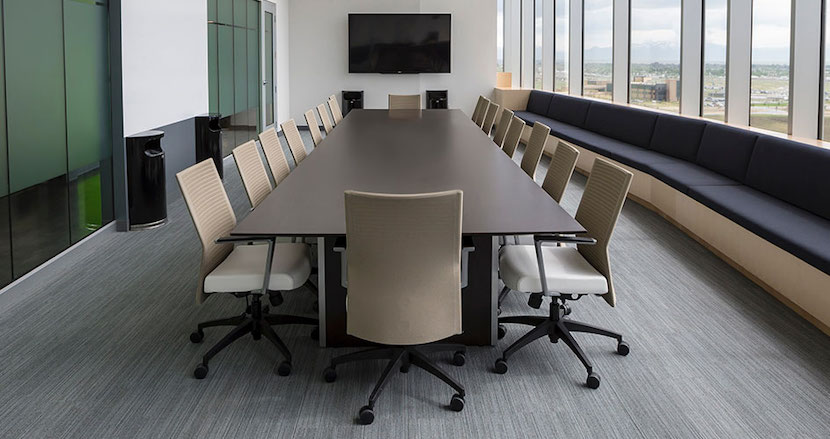
La reducción del ruido es fundamental en la mayoría de los sistemas de audio para conferencias. A menos que la sala sea excepcionalmente silenciosa, parte del ruido de fondo natural de este espacio será captado por los micrófonos y transmitido al otro extremo de la conferencia, lo que aumentará las distracciones y reducirá la inteligibilidad del habla.
A continuación se ofrece una visión general de la función de reducción de ruido en la plataforma integrada de procesamiento y distribución de audio y vídeo Tesira de Biamp, brand that sells in Spain AVIT Vision.
Disponible en todas las entradas de Cancelación de Eco Acústico (AEC), Tesira proporciona una gran ayuda para las aplicaciones de conferencia a distancia.
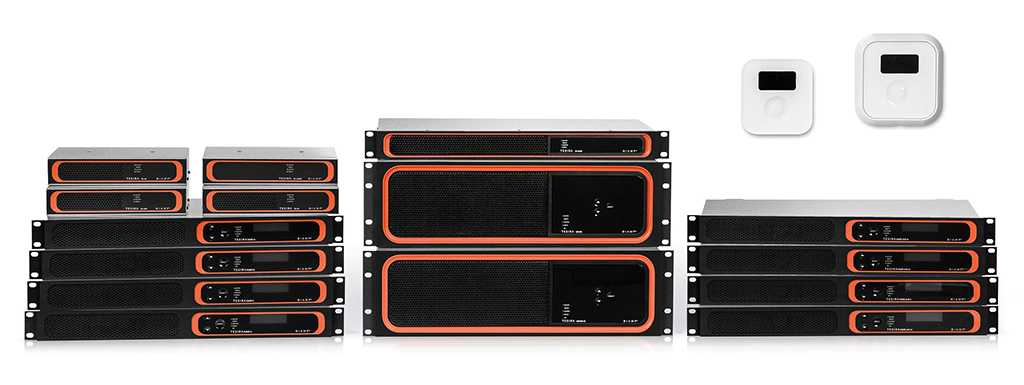
 La reducción de ruido (NR) de Tesira es un subconjunto del bloque de entrada AEC que se implementa utilizando el hardware de procesamiento DSP de la entrada AEC, donde está disponible en cada canal de entrada, incluso cuando la AEC está desactivada.
Esta reducción es más efectiva en la gestión de ruidos mecánicos cíclicos y repetitivos, como los ventiladores del proyector o los ruidos del motor de los refrigeradores, y no lo es en ruidos aleatorios, como el aire que sopla a través de la pantalla de un micrófono, el cierre de puertas, el crujido de papeles, las sirenas, los ladridos de perros o similares.
Cuando las personas están hablando, el ruido suprimido será más audible, ya que los filtros NR se relajan para reducir la incidencia en la conversación.
Estructura de ganancia
 Es importante configurar los micrófonos con una estructura de ganancia de entrada adecuada, lo que evita crear un piso de ruido artificialmente alto (se trata del ruido de fondo ambiental en una sala, que es aleatorio y totalmente variable).
La interacción entre el proceso de reducción de ruido y el suelo de ruido puede dar lugar a artefactos audibles, como el goteo de agua o sonidos de susurros, ya que el NR intenta perseguir sonidos aleatorios con un éxito variable.
Otro elemento conviene tener en cuenta son los ajustes. Es necesario escuchar la salida de los micrófonos para ajustarlos correctamente, lo que se consigue a menudo llamando a una sala de conferencias desde una ubicación remota.
Antes de aplicar la NR es recomendable escuchar la salida de los micrófonos y aumentar el Filtro de paso alto hasta que la mayor parte del ‘estruendo’ de las bajas frecuencias se elimine (este ajuste se encuentra en el bloque AEC > Ch Processing > Advanced Filters).
 El valor por defecto es de 70Hz, pero la mayoría de las salas se benefician de un cambio entre 125Hz y 195Hz. En raras ocasiones una sala necesita llegar hasta los 250Hz, ya que puede afectar negativamente al tono de los interlocutores en la sala.
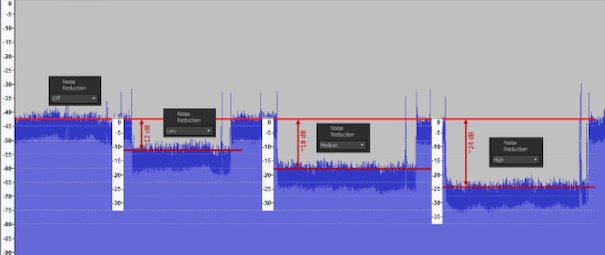
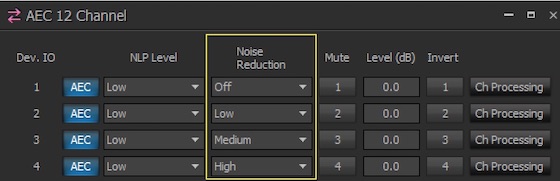
Existen cuatro niveles de NR definidos por el usuario: Desactivado, Bajo, Medio y Alto. Este último puede reducir el ruido hasta unos 12 dB; el nivel medio lo hace hasta unos 18 dB y el alto lo logra hasta unos 24 dB. Los resultados varían dependiendo de las propiedades únicas de los ruidos que se quieren reducir.
Por ello es conveniente escuchar con la función NR desactivada, luego mover el ajuste a nivel Bajo y escuchar. Según sea necesario se utiliza el nivel Medio y Alto, eligiendo la mejor solución para cada micrófono en la sala. Las fuentes de sonido localizadas pueden motivar que se utilicen diferentes niveles de NR para cada micrófono.
For example, si un ruido mecánico está 10dB por encima del ruido de fondo en el micro Nº 1, y 20dB por encima del ruido de fondo en el micro Nº 2, entonces los ajustes de NR Bajo (unos 12dB) para el primer micro y Medio (unos 18dB) para el segundo, pueden ser apropiados.
Estos ajustes utilizan el NR para eliminar el ruido mecánico y evitan una interacción excesiva con el ruido de fondo. Si se intenta utilizar la NR para reducir el ruido de fondo ambiental, que es aleatorio, se producen artefactos, ya que no hay ningún patrón presente para que el algoritmo de NR pueda predecir y suprimir.
Si hay artefactos audibles en la salida del micrófono (a menudo percibidos como goteo de agua o susurros) hay dos maneras de intentar resolver este problema.
La primera es bajar la Reducción de ruido que se aplica en un paso y escuchar la salida. ¿Es clara? Si no es así hay que volver a reducirla. Si los resultados son aceptables, no hay problema y, en caso contrario, hay que intentarlo con la segunda manera.
En esta hay última que reducir la ganancia de entrada del micrófono para reducir el ruido de fondo. Hay que volver a escuchar con la función NR desactivada, luego pasar a la función Baja y escuchar, y repetir si es necesario con nivel Medio y Alto.
Did you like this article?
Subscribe to our NEWSLETTER and you won't miss anything.
Related articles
 Vissonic modernizes the AV system in the meeting rooms of an oil company
 Biamp Apprimo Touch 8i: touch panel control for meeting rooms
 Sharp/NEC P627UL: High Brightness Low Noise Laser Projection for Meeting Rooms
 Biamp reinforces its range of Desono speakers for meeting and commercial rooms
 Anolis Eminere creates the ambient lighting for the ECC rooms in Berlin
 Biamp TEC-X: new range of control interfaces for conference rooms
 Biamp updates its online tool to design conference rooms
 Utelogy brings Artificial Intelligence to meeting rooms
 Uber ATG renews its meeting rooms with Biamp technology
 Biamp Parlé: microphones for conference rooms with Beamtracking
 AMX Acendo Core: collaboration system, presentation, web conference and room reservation
 Biamp Systems expands its offering of conference room solutions
 Elo shows at Paris Retail Week how to reduce the gap between the online world and physical stores
 Jabra Evolve: auriculares profesionales para entornos laborales con elevado ruido ambiente