


Vestel powers hybrid working with VHuddle Pro meeting room solution
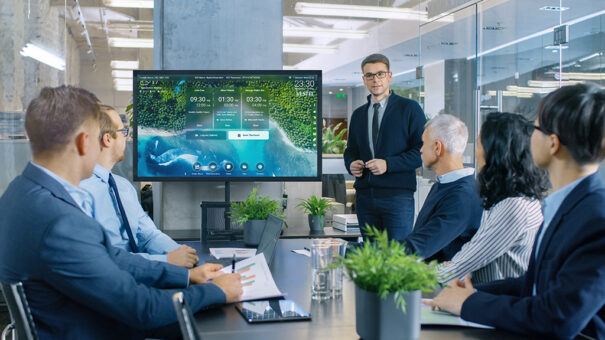
Diseñada para maximizar la experiencia en el lugar de trabajo, esta solución de Vestel está integrada por el software VHuddle Pro; la pantalla interactiva IFM 4K HDR, con módulo de PC Windows 10 OPS enchufable; y una webcam 4K.
Vestel acaba de anunciar la solución para salas de reuniones VHuddle Pro. Diseñada para maximizar la experiencia del lugar de trabajo digital, se compone del software VHuddle Pro, la pantalla interactiva IFM 4K HDR, con módulo de PC Windows 10 OPS enchufable, y una cámara web 4K.
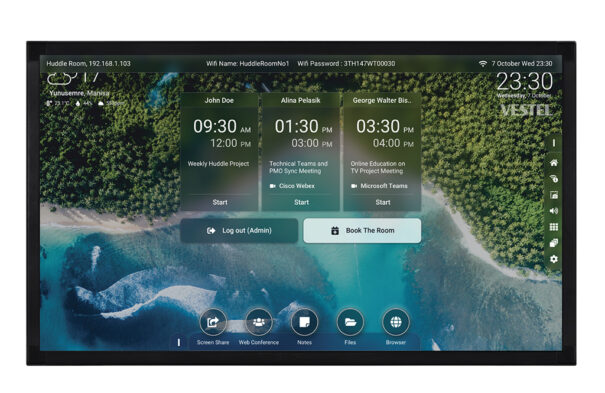
Agilizando cada paso en el proceso de configuración de la reunión, cuenta con aplicaciones críticas para el negocio preseleccionadas en una barra de aplicaciones y permite lanzarlas con un toque o un clic, gracias al software VHuddle Pro.
“El centro de colaboración y comunicaciones de próxima generación VHuddle Pro ofrece una completa solución para una experiencia de trabajo híbrido más personalizada e intuitiva. Conectando de forma segura a las personas a través de diferentes dispositivos y ubicaciones, aporta a las empresas multinacionales, así como a las de nueva creación, el apoyo sin fisuras que necesitan para los diferentes estilos de colaboración, ya sea para las interacciones en persona o híbridas en pequeñas sesiones de huddle de equipo, o a nivel de gestión en las salas de conferencias”, expica Selcen Uyguntuzel, Vestel Deputy General Manager of Sales.

Software VHuddle Pro
Al ofrecer un ecosistema personalizable para el lugar de trabajo híbrido, VHuddle Pro permite preseleccionar una serie de aplicaciones críticas para la empresa y clasificarlas en las pestañas correspondientes (Pantalla compartida, Conferencia web, Notas, Archivos y Navegador) en la barra de herramientas de Compact Apps para facilitar la navegación.
Con su solución de software, VHuddle Pro proporciona acceso directo a cada una de estas apps, asegurando un soporte de inicio rápido con un toque o un clic del ratón.
Módulo PC Windows 10 OPS
Fácil de integrar en la vida laboral, VHuddle Pro minimiza la necesidad de formación del usuario, providing, con su módulo plug-in Windows 10 OPS PC, una experiencia de espacio de trabajo digital familiar, que incluye el acceso a Office 365 y Teams.
Aunque todas las opciones están diseñadas para ser preconfiguradas por los departamentos de TI para mantener la seguridad de las redes informáticas y la experiencia de los usuarios uniforme, existe una gran flexibilidad para adaptarse a diferentes estilos de colaboración.
Se pueden preseleccionar hasta tres aplicaciones de pizarra digital para la pestaña ‘Notas’, lo que da a los equipos la libertad de utilizar, For example, OneNote para tomar notas rápidas; Microsoft Ink Workspace, para colaborar en diseños; y Microsoft Whiteboard, para compartir ideas y hacer anotaciones sobre los archivos.
Para reducir las tareas administrativas y organizativas en torno a la colaboración, las reuniones se pueden programar con el calendario y las salas reservar en un instante con la pestaña ‘Reservar la sala’.
Las videoconferencias programadas están diseñadas para aparecer en la vista del calendario y ofrecen la opción de ‘Iniciar’ con un solo clic o toque para ahorrar tiempo.
Interactive screens
Con la pantalla interactiva IFM, el VHuddle Pro se convierte en el compañero de trabajo híbrido definitivo.
Diseñada en tamaños de pantalla de 55, 65, 75 y 86 pulgadas para adaptarse a todas las aplicaciones corporativas, desde espacios de reunión hasta grandes salas de reuniones, la serie es un atractivo centro multimedia interactivo. Desde su diseño minimalista de bisel súper delgado, da vida al contenido, con soporte para imágenes 4K HDR impactantes y extra nítidas y vídeos 4K HDR a 60 fps.
La equidad en las reuniones también es fácil de lograr para la colaboración de estilo híbrido, con la pantalla IFM 4K, que trabaja con la cámara web 4K para asegurar que los participantes remotos puedan ser vistos de forma clara.
Una superposición interactiva IR táctil de diez puntos con un acabado superliso antirreflectante impulsa una colaboración, mientras que el lanzador de paleta rápida permite a los miembros del equipo trabajar a su ritmo, ofreciendo acceso con un solo toque a las herramientas de lápiz, resaltador, captura de pantalla y recorte de pantalla.
Entre las características adicionales se incluye un lápiz doble que puede ofrecer dos puntas de tamaño alternativo y reconocimiento automático de colores, así como una función de conversión de escritura a texto digital.
Did you like this article?
Subscribe to our NEWSLETTER and you won't miss anything.
Related articles
 He 82% of companies already consider audiovisual key for hybrid work
 Yealink MeetingBar A25, All-in-one AV solution for small meeting rooms
 Jabra Speak2: professional speakers to encourage hybrid work
 Vestel IFX: new generation of 4K interactive displays for classrooms and meeting rooms
 Jabra PanaCast reinvents meeting rooms and hybrid work
 Maverick AV Solutions completes its offer for hybrid work with Logitech
 ClearOne Unite 10 y 50 4K AF: collaboration for hybrid work environments
 TouchONE: Integrated room and workspace booking solution
 Kramer PA-120Z y PA-240Z: high and low impedance power amplifiers for meeting rooms
 Acendo Book, AMX plug and play solution for booking meeting rooms in SMEs
 Crestron will market its DM-DGE-200-C meeting room solution in September
 Biamp Devio: collaborative work tool for small meeting rooms
 Caverin Solutions sells the Smart Kapp digital solution for meeting rooms
 Mimio proposes at SIMO 2012 tools for training and working in meeting rooms