


Audac actualiza Touch, su herramienta para controlar instalaciones de audio
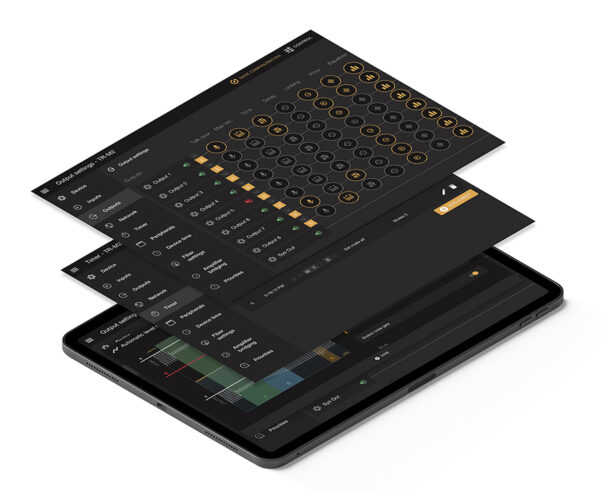
The version 2.7 of Audac Touch incluye nuevas funcionalidades para facilitar el control de las instalaciones de audio desde una única aplicación, como la lista de dispositivos, que ayuda a gestionar los diferentes equipos.
El fabricante belga Audac ha lanzado una nueva actualización de su software de control Touch, una herramienta que permite gestionar una instalación de audio desde una sola aplicación. In the version 2.7 se han incluido nuevas características como la lista de dispositivos.
La lista de dispositivos es un punto importante en Audac Touch que se utiliza para mostrar los que se encuentran en la instalación. However, con usuarios intensivos, la lista puede llegar a ser larga. Es por esto que en esta versión se ha dividido en un resumen de dispositivos y una página de descubrimiento.
Cuando se va a la página de descubrimiento Audac Touch empieza a buscar automáticamente los dispositivos de la red. Pero en lugar de recordar instantáneamente cada dispositivo en la aplicación sólo da una visión general de todos ellos. Entonces es posible decidir cuál añadir y cuál no.
En la página de guardados, se muestra un práctico resumen de todos los dispositivos que se han añadido a la cuenta. Para facilitar aún más el modo de descubrimiento de dispositivos, Audac también ha introducido una barra de búsqueda en la parte superior de esta página.
Audac también ha agrupado los dispositivos vinculados dentro del dispositivo directo, de modo que la lista es más limpia y organizada.
Un dispositivo directo es aquél que se controla utilizando la propia dirección IP del dispositivo. Mientras que uno vinculado es aquel que se controla utilizando la IP de otro.
Otra nueva y práctica función es la sonda de dispositivos. El sondeo se utiliza cuando se quiere cambiar físicamente un dispositivo, For example, cuando se va a sustituir por uno nuevo. La sonda buscará todos los dispositivos con el mismo tipo para poder actualizar la base de datos de Audac Touch sin tener que cambiar todo manualmente.
Las plataformas soportadas por esta aplicación de de Audac, brand that distributes SeaSound, son Linux, iOS, Android y Windows.
Did you like this article?
Subscribe to our NEWSLETTER and you won't miss anything.
Related articles
 Work Pro updates its range of amplifiers for Synthea AV installations
 Spottune: 360º wireless audio to provide sound for all types of installations
 Brainstorm updates Edison, your tool to create VR/AR presentations
 Metro Stadium actualiza sus instalaciones de audio con Renkus-Heinz
 Biamp actualiza su herramienta online para diseñar salas de conferencia
 Audac MFA: multifunctional amplifiers for small and medium-sized installations
 Audac simplifica la configuración de su software de control Touch
 Audac ATEO2S: speaker for fixed installations in shops and offices
 WHEREAS 2019: Audio-Technica actualiza su gama de micrófonos Engineered Sound para instalaciones
 Audac facilita la configuración de Imeo1 en las instalaciones de audio
 Apart Audio PreZone1: preamplificador para controlar dos zonas independientes
Elo Touch updates its line of touch monitors 02 and 03-Series for retail and healthcare environment
Modulo Player v4, herramienta de red multivídeo para espectáculos e instalaciones permanentes
Apart Audio PreZone1: preamplificador para controlar dos zonas independientes
Elo Touch updates its line of touch monitors 02 and 03-Series for retail and healthcare environment
Modulo Player v4, herramienta de red multivídeo para espectáculos e instalaciones permanentes
 NEC Display Solutions updates its high-end projectors with PH1400U for large installations