


Microsoft Teams Essentials lleva la colaboración a las pequeñas empresas
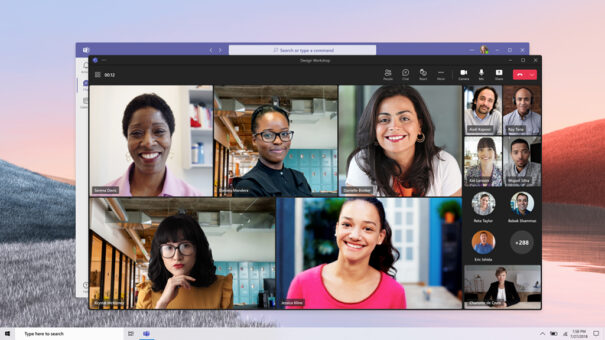
Diseñada para mejorar la comunicación y productividad de las pequeñas empresas, Microsoft Teams Essentials ofrece reuniones, chat y colaboración profesionales, seguras y a un precio asequible.
Microsoft Teams Essentials es una solución diseñada para mejorar la colaboración, comunicación y productividad de las pequeñas empresas. Asequible y completa, ofrece una sencilla interfaz y características que ayudan a adaptarse a un nuevo entorno de trabajo híbrido. Una aplicación intuitiva con videoconferencias ilimitadas de hasta 300 users, 10 GB de almacenamiento en la nube por persona, chat grupal y calendario.
Funciona en la nube de Azure, lo que implica máximas garantías en términos de seguridad, reliability, rendimiento y soporte. Besides, cuenta con distintas políticas y controles de privacidad para que las pequeñas empresas puedan comunicarse y colaborar de manera segura.
Teams es utilizado por 138 organizaciones con más de 100.000 users, and more than 3.000 organizaciones con más de 10.000 usuarios en todo el mundo.
Con la llegada de Teams Essentials, las pequeñas organizaciones tienen a su alcance las herramientas de colaboración necesarias para la coordinación de su actividad, como las grandes multinacionales, con un despliegue simple y un coste asequible.
Team Essentials presenta nuevas capacidades y opciones que minimizan el tiempo de puesta en marcha de la comunicación entre empleados, lo que permite reducir costes, aumentar la agilidad y ofrecer la mejor experiencia.
Features:
- Reuniones extendidas: se pueden realizar llamadas de mayor duración, con un límite de 30 hours, tanto para reuniones 1:1 como para sesiones en grupo.
- Más asistentes por reunión: capacidad de albergar hasta 300 personas simultáneamente, con la posibilidad de reunir a todos los asistentes en la misma sala virtual.
- Calendarios: permite integrar tanto el calendario de Outlook como el de Google.
- Plantilla de chat grupal: se puede iniciar un grupo de trabajo y organizar reuniones con cualquiera de los empleados, asignar tareas al equipo y crear encuestas para recibir comentarios, todo en una sola aplicación.
- Almacenamiento en la nube adicional: cualquier trabajador puede consultar, editar y guardar archivos de Office 365. Ofrece un espacio total de almacenamiento de 10 GB.
- Chat continuo: todas las conversaciones están disponibles y no se eliminan cuando termina la reunión.
- Invitaciones más sencillas: permite enviar el enlace de la reunión a través del correo electrónico. Los usuarios que no dispongan de la aplicación podrán acceder directamente desde su navegador.
- Reuniones más profesionales: herramientas como subtítulos, reacciones en vivo y fondos virtuales consiguen personalizar cualquier reunión. El chat posibilita el acceso rápido a todo el contenido compartido: se organiza por categorías como ubicaciones, photos, archivos, listas de tareas, próximos eventos y enlaces web.
Did you like this article?
Subscribe to our NEWSLETTER and you won't miss anything.
Related articles
 Telefónica y Microsoft aportan soluciones conjuntas de colaboración para empresas
 Microsoft reinvents Teams to make collaboration more efficient
Barclays implementa Microsoft Teams como plataforma de colaboración
Microsoft reinvents Teams to make collaboration more efficient
Barclays implementa Microsoft Teams como plataforma de colaboración
 Bose brings its video and audio technology to small rooms with Videobar VB-S
 Telefónica Tech expands its collaboration offer with Microsoft Teams Essentials
 Maverick AV organizes an event focused on Microsoft Teams
 Sharp y Microsoft invitan al sector a Teams Live Event sobre trabajo dinámico y colaboración
 Avocor presenta su pantalla de colaboración Windows certificada para Microsoft Teams
 Microsoft añade funcionalidades a Teams que mejoran la colaboración virtual
 CTouch for Teams: interactividad táctil y colaboración con equipos Microsoft
 SPC presenta Yealink VC210 Teams Edition: certified collaboration bar with Microsoft Teams
 Sennheiser Expand SP 30T: audio conferencing for Microsoft Teams
 Polycom amplía su soporte a la plataforma de colaboración Microsoft Teams
 Netgear launches video surveillance suite for small businesses