


NEC Display amplía la compatibilidad de su software ProAssist a más proyectores
El fabricante ha incorporado más características y capacidades de esta solución para proyectores para realizar instalaciones más rápidas, con múltiples configuraciones y sin problemas.
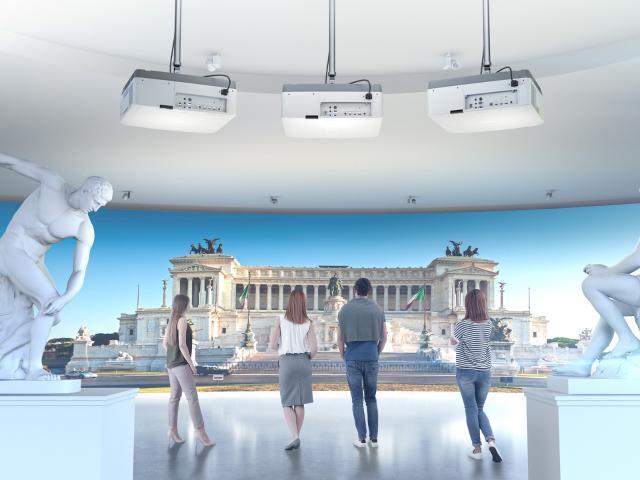
El software ProAssist de NEC Display es ahora compatible con un mayor número de proyectores del fabricante, como los modelos NP-PA803UL y NP-PA703UL (versión de firmware 1.12 o posterior); NP-PA804UL, NP-PA1004UL y NP-PX803UL (v1.11 o posterior); NP-PX1004UL (v1.07 o posterior), así como con NP-PX1005QL, NP-PH2601QL y NP-PH3501QL.
Además de ayudar a los profesionales a realizar instalaciones más rápidas y sin problemas, ProAssist admite múltiples configuraciones de proyectores en red con nuevas características y capacidades, incluyendo ajuste de lentes y geometría, mezcla, uniformidad de color y balance de blancos.
ProAssist es una solución de ajuste y control de calidad profesional y fácil de usar para lograr una proyección brillante y coordinada desde múltiples equipos de instalación. Tanto si el iluminador utiliza técnicas de apilamiento, mezcla de bordes o mapeo de proyección, este software garantiza la uniformidad en toda la imagen.
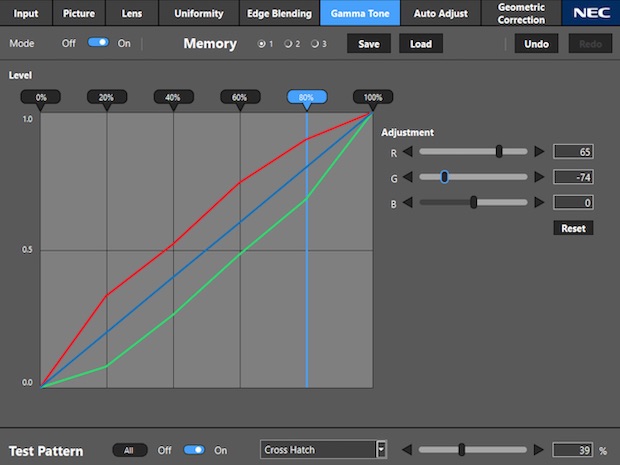 Los instaladores pueden utilizar ProAssist desde un ordenador o tableta a través de una red para ajustar cada proyector y corregir cualquier desalineación, ahorrándoles la necesidad de realizar ajustes manuales, que requieren mucho tiempo, en cada equipo individualmente.
“Creamos ProAssist específicamente con los expertos en instalación en mente, dándoles una manera más fácil de controlar y ajustar sus proyectores y crear impresionantes imágenes y escenas multiproyector -asegura Rich McPherson, gerente de producto senior de NEC Display-. Con esta solución dinámica, ‘el cielo’ es el límite de cómo se puede usar y qué se puede crear”.
ProAssist hace la corrección de la imagen sin esfuerzo y permite el ajuste de la calidad de la imagen utilizando todos los controles, como el brillo, el contraste, el balance de blancos, etc. A se se suma la funcionalidad de la lente para el enfoque de la imagen, ya sea para hacer zoom o cambiar según sea necesario.
Otra de sus ventajas es que los usuarios pueden encender y apagar los proyectores, cambiar las entradas y modificar todo lo que normalmente está disponible en el menú, sin que este se muestre en la imagen proyectada y distraiga a la audiencia, y realizar dichos ajustes en remoto.
ProAssist está especialmente indicado para causar una impresión diferencial con su imagen o contenido en una pantalla grande en un aula, meeting room, auditorium, y para aplicaciones de señalización digital, leisure and entertainment, exposiciones y museos.
Did you like this article?
Subscribe to our NEWSLETTER and you won't miss anything.
Related articles
 Vioso will highlight improvements in its projector calibration software at ISE
 Lumens Expands NDI Compatibility with New VC-TR61N Camera
 Holoplot amplía su ecosistema de software de sonido con Plan 2.0
 Lumens expands compatibility with Bosch Dicentis conference system
 Sharp NEC Display Solutions expands its ME Series with two new business projectors
 Mersive Solstice Conference 5.3 amplía la compatibilidad con espacios híbridos de reunión
 NEC Display develops MediaPlayer software with Raspberry Pi for digital signage
 Epson interactive projectors integrate SMART Notebook software
 Audio-Technica amplía la compatibilidad de sus productos para red de audio Dante
 NEC Display expands its UM Series with projectors that encourage interactivity and collaboration
 Symetrix SymNet Composer 3.0 amplía su compatibilidad con sistemas de terceros
 NEC Display amplía la Serie PA con siete nuevos proyectores UHD
 NEC Display Solutions expands its range of M-series portable projectors
 Projectiondesign amplía la funcionalidad del software de gestión ProNet 2.0