


Cómo conseguir una correcta visualización en espacios de reunión y formación
El tamaño de la pantalla influye directamente en la participación y opción de toma de decisiones de los asistentes a una reunión. In this column, Daniel Collado, Pre Sales Specialist de Maverick AV Solutions, reflexiona sobre el porqué es importante invertir en una solución que ofrezca una mejora en eficiencia, productividad y satisfacción del usuario.

Cuando hay que elegir un sistema de visualización para un entorno profesional, siempre surgen una serie de dudas y preguntas en la elección del producto que pueda realizar mejor la función. La mayor parte del tiempo en la jornada laboral estamos visualizando información, y la fatiga visual puede incrementarse si no hemos elegido correctamente.
Elementos como, resolution, brightness, contrast, tamaño y entorno son factores que hay que comprender para un buen asesoramiento a los clientes.
La normativa DISCAS (ANSI/Infocomm V202.01:2016 Display Image Size for 2D Content in Audiovisual Systems 2016-05-23), que se puede encontrar en este link, tiene como objetivo definir el tamaño requerido de pantalla para un sistema audiovisual determinado teniendo en cuenta la distancia con la audiencia, y se basa en la visión humana y en datos completamente científicos.
El estándar determina el tamaño requerido de imagen para una pantalla y las posiciones relativas de visualización según dos necesidades o escenarios definidos: la toma de decisión básica y la toma de decisión analítica.
Estas dos categorías de visualización se derivan del estándar ANSI/Infocomm 3M-2011 Projected Image System Contrast Ratio [PISCR] (Relación de Contraste de un Sistema de Proyección de Imagen). La altura, resolución y tamaño del contenido de la imagen son elementos preceptivos cuando se determina el tamaño de imagen requerido.

La regla 4/6/8
Until now, la industria AV ha usado cálculos que han dado resultados y cumplieron el propósito, pero cuya procedencia y bases no podían ser verificados. La normativa DISCAS se refiere a factores humanos comprensivos de agudeza visual y ubicación relativa a la imagen como altura, resolution, tamaño del contenido, distancias de visualización y posiciones relativas horizontales y verticales.
La normativa DISCAS define 3 tipos de visualización relacionados con el múltiplo máximo de la altura vertical de la imagen:
Toma de decisión analítica (ADM). Distancia del espectador más lejano de cuatro veces la altura vertical de la imagen.
El espectador está completamente involucrado con los detalles mínimos presentes en el contenido y necesita poder resolver todos los elementos de la imagen mostrada. Soporte de entornos de toma de decisiones analíticas evaluaciones críticas, which include, among others, el examen de imágenes médicas, bellas artes, dibujos de ingeniería o arquitectura, etc.
Los criterios de diseño del sistema pueden incluir una o ambas de estas categorías de visualización según las necesidades del espectador.
Toma de decisión básica (BDM). Distancia del espectador más lejano de seis veces la altura vertical de la imagen.
El espectador puede tomar decisiones básicas basadas en la imagen mostrada, estas no dependen de detalles críticos dentro de la imagen. El espectador puede retener y asimilar la información perfectamente, además participa en el contenido (For example, classes, meeting rooms, salas de múltiples usos, ilustraciones de productos, etc.).
Las imágenes y el texto son legibles en la medida que el espectador pueda tomar decisiones basadas en lo que ve. Las decisiones se toman al comprender el contenido informativo en sí mismo y no dependen de la resolución de cada elemento de detalle.
Visualización pasiva. Distancia del espectador más lejano ocho veces la altura vertical de la imagen.
El espectador puede reconocer cuáles son las imágenes en una pantalla y separar texto o la imagen principal del fondo, bajo una iluminación ambiente típica para la visualización. El contenido no requiere asimilación y retención de detalles, se entiende la intención general. Hay un compromiso pasivo con el contenido (For example, visualización informal o no crítica de videos y datos).

Como determinar la altura de la imagen
La fórmula para determinar la altura de la imagen en base a una tarea de visualización es la siguiente:
SH = D / SL
SH = Altura de la pantalla.
D = Distancia a la que se encuentra el espectador que está más alejado de la pantalla.
SL = Nivel de detalle de la pantalla.
SL = 4 para detalles de inspección (Toma de Decisiones Analítica).
SL = 6 para uso detallado (Toma de Decisiones Básica)-
SL = 8 para la visión general (Observación General, normalmente visionado de películas)-
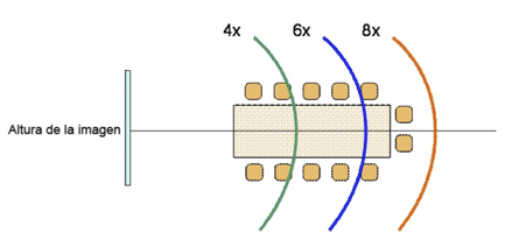
La unidad de medida de (SH) será la misma que para (D), independientemente de que esté expresada en pulgadas, pies o milímetros.
Ejemplo:
Tenemos una sala de unos 40 m2 de tamaño con una capacidad para unas 15 personas donde la distancia del espectador más alejado es de 7 metros y la aplicación será para SH= 7 / 6 = 1,16 mts altura mínima
Sabiendo la altura podemos conocer cuál será el tamaño de la diagonal en pulgadas, usando un calculador de fabricante como, For example, el que ofrece Epson y que se puede consultar en esta página.
Una vez realizados estos dos procesos, se conocerá la altura y posteriormente se podrá averiguar la diagonal en pulgadas, que indica el tamaño mínimo que se necesita para una visualización correcta.
Si se conoce la altura de la pantalla y la tarea de visualización, es posible determinar la distancia máxima del espectador.
Distancia al espectador más alejado
D = SH * SL
Distancia al espectador más alejado = altura de la pantalla * tarea
Ejemplo:
With a screen 65 diagonal inches, su altura es de 0,81 mts y la tarea de visualización será BDM.
D = 0,81 * 6 = 4,86 metros será la distancia donde deberá estar el espectador más alejado.
Conclusiones
Resulta evidente que el tamaño de visualización influye directamente sobre la participación de los asistentes de una reunión o formación. Es importante confiar en especialistas que sepan tener en cuenta todos los factores y que sepan entender las necesidades reales del usuario final, ya que no todos necesitarán lo mismo.
No se trata de buscar la solución más barata o más cara, sino de invertir en la solución que podrá aportar más beneficios, mejorando eficiencia, productividad y satisfacción de los usuarios.
Daniel Collado
Pre Sales Specialist de Maverick AV Solutions

Did you like this article?
Subscribe to our NEWSLETTER and you won't miss anything.
Related articles
 Lumens and Televic automate hybrid meeting spaces
 DVIN incorporates Crestron technology into its meeting spaces
 Arthur Holm will redefine InfoComm 2025 meeting spaces
 Extron offers automated display control in meeting spaces
 Kscape and Samsung collaborate to reinvent meeting spaces
 Maverick AV Solutions will promote at ISE 2023 smart meeting spaces
 MFS upgrades its meeting spaces with Planar TVF video walls
 Harman transforms meeting spaces with the new AMX line
 Kramer DSP-62-AEC: quality sound for meeting spaces
 Cómo conseguir que las reuniones virtuales sean más productivas
 Maverick AV Solutions will display an ISE 2020 your meeting space strategy
 Sennheiser shows at InfoComm how to achieve an optimal experience in collaboration environments
 Atlona simplifies multi-format switching in meeting spaces
 Plantronics transforms small meeting rooms into collaboration spaces