


Zoom Team Chat streamlines collaboration in hybrid work
 Among the new features that have been included in the collaboration center for companies is the ability to share chat, poder responder por chat a una invitación de reunión entrante y acceder a zoom Team Chat desde cualquier lugar.
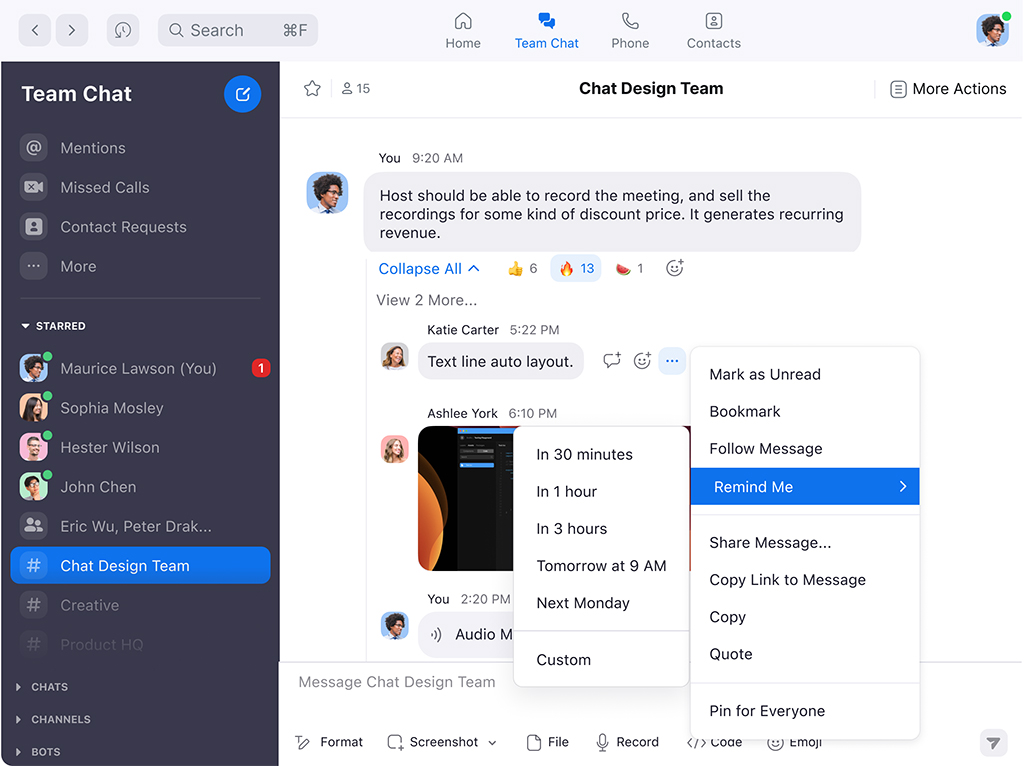
zoom ha revelado las nuevas funciones para Team Chat (anteriormente llamado Zoom Chat), el centro de colaboración para empresas que permite a los equipos comunicarse de forma rápida y segura, interna y externamente.
Escribir a través de Zoom significa mucho más que usar la pestaña de chat ubicada en la parte inferior de la pantalla. La solución ofrece un eficiente centro de soluciones con chats y canales para mantener los proyectos en curso, y así, garantizar un contacto eficiente con todo el equipo.
Zoom Team Chat facilita la colaboración al recopilar mensajes, compartir archivos, aplicaciones de terceros, video, voz y pizarra en una sola plataforma, de manera simultánea.
Desde cualquier conversación, los usuarios pueden activar la pizarra, convertir el chat en una reunión o llamada telefónica, o incluso, compartir un mensaje de vídeo grabado, todo dentro de la plataforma Zoom.
Zoom Team Chat no es solo para la comunicación entre los empleados de una organización. Also, ofrece una experiencia de mensajería lineal y segura para contactos externos. Los usuarios encuentran un aviso junto a la casilla de “escribir” para que cuando haya participantes ocupados o ausentes, se les informe de su acceso a la app.
Nueva representación visual
Team Chat también tiene un nuevo aspecto. Zoom actualizó los colores de su tipografía, los íconos de productos y lanzó una campaña global que presenta nuevos elementos visuales que representan su plataforma unificada.
El conocido logotipo de Zoom seguirá siendo el mismo, pero ha reemplazado el “Os” en su nombre por íconos para comunicar que es la única plataforma donde realmente se realiza la conexión. El nuevo ícono de Team Chat se coloca primero en la lista de herramientas para demostrar este centro que conecta todos los flujos de trabajo de la aplicación.
New features:
- Compartir el chat de una reunión con el equipo, incluidos sus enlaces, archivos o información relevante.
- Programar reuniones directamente desde el chat.
- Generar recordatorios y notificaciones de “respuesta automática”, de modo que cuando un usuario llamado esté en otra reunión, se le notifique en un momento más conveniente.
- Responder por chat a una invitación de reunión entrante. Los usuarios pueden enviar un mensaje a la persona que los invitó, para informarle que están ocupados o que le devolverán la llamada.
- Acceder a Zoom Team Chat en cualquier lugar. Permite el acceso directo desde el navegador para que los usuarios puedan colaborar fuera de las reuniones con el chat, incluso si la aplicación de Zoom no está instalada.
You liked this article?
Subscribe to our RSS feed And you won't miss anything.
Other related articles
- 26 March 2024 Zoom Workplace: new AI-powered collaboration platform
- 8 March 2024 Extron ConferenceShare: Wireless conferencing for ShareLink Pro
- 8 March 2024 RTI Control Expands Your Collaboration Ecosystem with Intelligent Meetings
- 19 February 2024 Home Group Incorporates a Complete AV Ecosystem with Pure AV
- 9 February 2024 Las barras de conferencia de Biamp reciben la certificación de Zoom
- 6 February 2024 "TD Synnex Maverick is the only wholesaler to provide a solution 360 to the channel", Carlos Bertrand
- 2 February 2024 Crestron Showcases New PTZ Cameras at ISE 1 Beyond
- 18 January 2024 DTEN amplía su propuesta de videoconferencia a las salas pequeñas
- 4 January 2024 Shure optimiza el sonido en la universidad pública de Hong Kong
- 21 December 2023 Extron ZRTP Pro: Zoom Rooms Certified Touchscreens
- 3 November 2023 Magewell Achieves Zoom Certification for USB Capture Devices
- 24 October 2023 Extron AV Technology Powers Healthcare Education at BCIT