


Equipson launches new visualization software for LightShark solutions
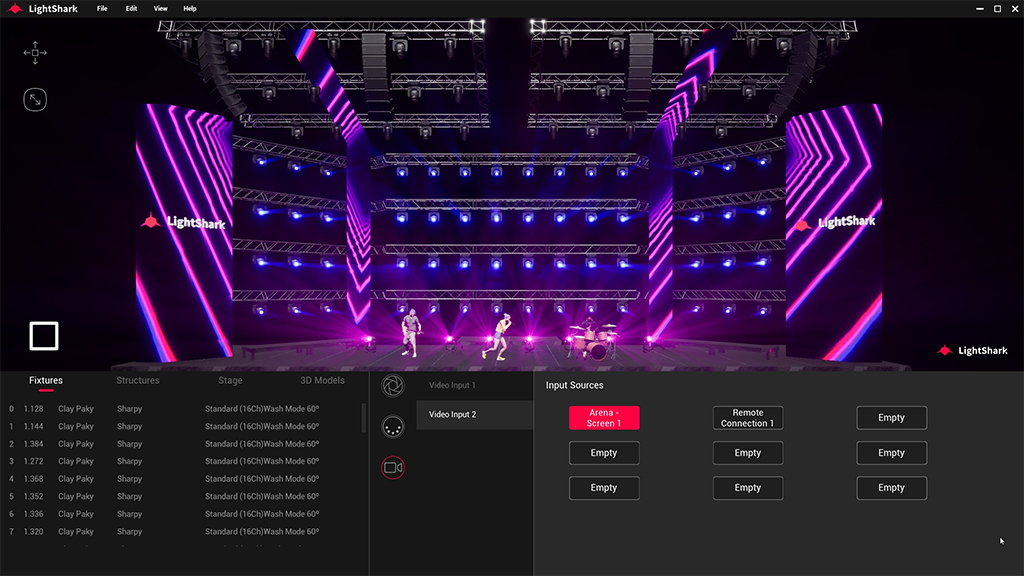
This tool allows users of LightShark, brand of Equipson, experiment with different scenarios using preconfigured files and devices.
The Spanish manufacturer Equipson has launched LightShark RAY, a new software addition to their range of hardware based lighting consoles DMX.
Presented for the first time at the fair LDI 2022 from las vegas, LightShark RAY is a visualization program that uses advanced simulation technology to help improve the experience with the product range.
Initially developed as a training tool, LightShark RAY covers various scenarios and allows you to experiment with different lighting configurations by choosing different files and preconfigured fixtures. Next, Different choices can be applied to the projects themselves in a simple way.
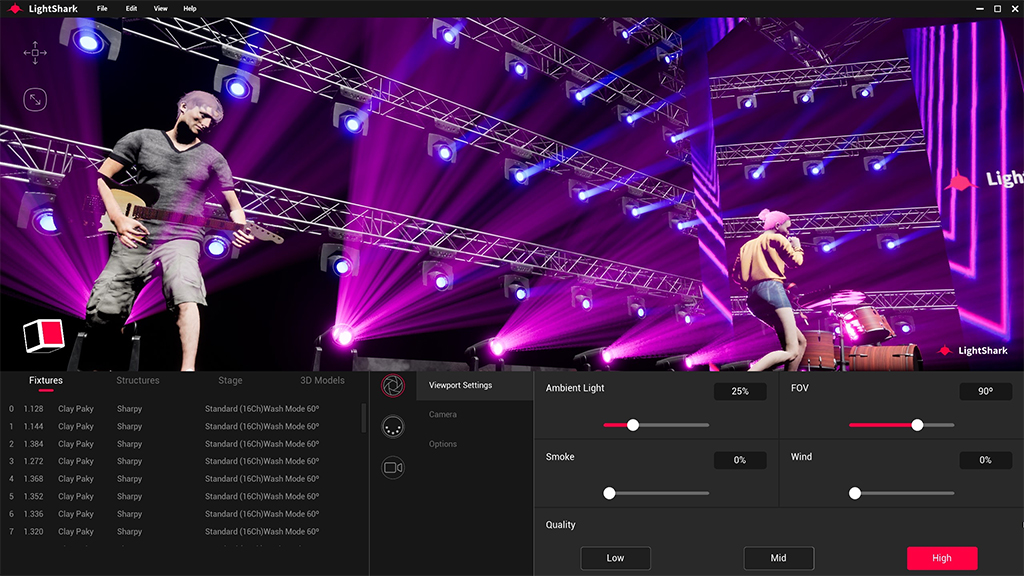
“We decided to create a viewer after customers asked us for a feature that would help them simplify their interaction with LightShark.. Although it has been a complex project, we think it's worth the effort, since the results are exceptional”, explains Juan José Vila, CEO of Equipson and LightShark.
LightShark RAY will initially offer fixed scenarios, but it is expected that one of these editors will be ready in the summer of 2023. Software features now available include receiving up to 16 universes with ArtNET or sACN and an integrated device library. There is also an object library with trusses, scenarios, etc., and plans to add GDTF libraries to future versions of the software.
Currently available for use on PC, and coming soon to macOS, LightShark RAY can also receive video from its NDI input, which is not only used to transmit a video file, but also allows you to capture images from external cameras.
Users can record views with the screen recording feature and personalize their viewing experiences with configurable parameters such as smoke density and wind speed for smoke movement.
Besides, there is an ArtNET/sACN monitor and DMX controlled camera positions with four configurable position presets. Render quality automatically adapts based on the computing capabilities of the end user, and you can display the FPS number.
Did you like this article?
Subscribe to our NEWSLETTER and you won't miss anything.
Related articles
 Equipson updates software for LightShark DMX lighting consoles
 Equipson updates the software of its LightShark lighting consoles
 Equipson gives the LightShark range its own brand identity
 Work Pro introduces a new lighting console concept with the LightShark range
 Visiology develops a new data visualization module for its Polywall software
 InfoComm 2013: Barco presents the version 2.5 of network visualization software for control rooms
 JVC launches new SuperLoLux HD video management software
 Park Media launches new Signage Center software 5 for Android and Linux players
 TRENDnet launches new free software for IP cameras SecurView Pro
 Midas launches 'Generation-II' software for all its digital consoles
 Surveon Launches New Compact NVR with Live View and HD Recording 16 canales
 IProNet launches a new version of its IP video management software for small installations
 Provisio launches a new digital signage version of the SiteKiosk software
 BrightAuthor v2.3 digital signage visualization software, available in 4 European languages