


Optoma ML550, 3D mini projector for mobility professionals
The latest novelty presented by Optoma is its ML550 portable projector. A team of 380 grams built with LED technology that offers WXGA resolution.
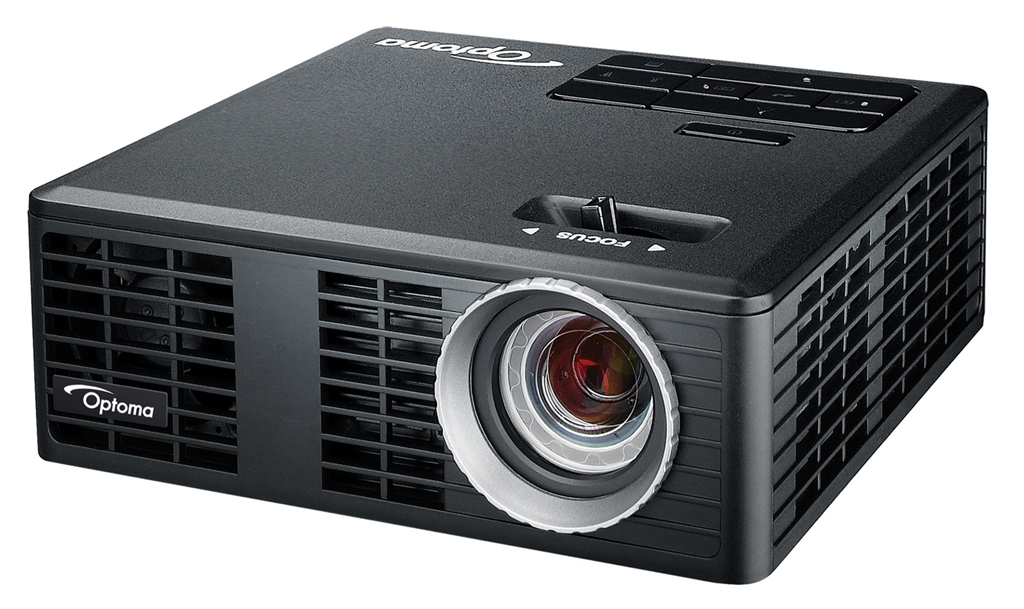
The projector Optoma ML550 has been designed with mobile professionals who want to deliver high-quality presentations wherever they go.. It has a weight of 380 grams and it only measures 105 x 106 x 39 mm. Despite its small size, The ML550 includes advanced features for movie playback, photographs and business exhibitions.
This Optoma projector is equipped with LED technology, incorporates a native WXGA resolution of 1280×800, a shine of 500 ANSI lumens and a high contrast ratio 10.000:1. All this allows the contents to be reproduced with great clarity, in addition to providing faithful and real colors.
Besides, Its latest generation lamp offers a useful life of up to 20.000 hours.
This equipment is capable of reproducing three-dimensional content thanks to its 3D Ready technology and its HDMI input.. For this, A PC with a QuadBuffer card or similar is required and Optoma ZD301 glasses must be used., which can be purchased separately.
Besides, supports Mobile High-Definition Link connection (MHL), that allows you to transmit Full HD images and videos directly to the projector from your smartphone, tablet, computer or any device that has an HDMI connection.
Supports almost all file formats used today (including the different formats Microsoft Office and Adobe PDF Files) and project any photograph, movie or presentation. These files can be stored in your memory up to 1,5 Gb capacity, view those saved on microSD cards thanks to the built-in slot or, also, directly from different devices that connect to it through its USB port 2.0.
Wireless connection
One of the new features that Optoma has incorporated into the ML550 projector is that documents can be shared wirelessly with your smartphone or tablet thanks to the free EZ View application., available for devices with Android and iOS operating systems.
To make this device wireless, and thus project from a computer or mobile device, just connect a mini Wi-Fi dongle (which can be purchased optionally) via the projector's USB port.
Did you like this article?
Subscribe to our NEWSLETTER and you won't miss anything.
Related articles
 Philips 16B1P3302D: portable monitor for mobility professionals
 Optoma joins the MCR professional solutions catalog
 Virtual reality, security and mobility for digital creators in the new HP workstations
 Optoma WU416: WUXGA resolution and 4.200 lumens for professional installations
 Signagelive merges cloud and mobility to create interactive digital signage applications
 Performance, innovation and mobility: HP Inc reinvents the professional workstation business
Optoma W350 y X350: professional network projectors for meeting rooms
Performance, innovation and mobility: HP Inc reinvents the professional workstation business
Optoma W350 y X350: professional network projectors for meeting rooms
 TouchPico: portable mini projector with Android that turns the wall into an 80” touch screen
 Optoma W505, Full HD projector 5.200 lumens for professional applications
Optoma ML800 y ML1000, Ultra-portable projectors designed for mobile professionals
Optoma W505, Full HD projector 5.200 lumens for professional applications
Optoma ML800 y ML1000, Ultra-portable projectors designed for mobile professionals
 Mitsubishi develops a new mini projector prototype for car dashboards
McDonalds makes the most of mobility and rich media for its summer campaign
Optoma EH300, Full HD projector 3.500 ANSI for professional environments
Samsung and Charmex see mobility as a promising future for digital signage
Mitsubishi develops a new mini projector prototype for car dashboards
McDonalds makes the most of mobility and rich media for its summer campaign
Optoma EH300, Full HD projector 3.500 ANSI for professional environments
Samsung and Charmex see mobility as a promising future for digital signage