





The collaborative software for education Smart Notebook 2015 will be available in April
The latest version of Smart Notebook learning software 2015 incorporates two new functions that help the student and teacher to achieve a better collaborative experience: the creator of teaching activities and the creator of concept maps.

Smart Technologies, whose products it distributes in Iberia Crambo Visuals, will present the latest version of the Smart Notebook collaborative learning software to the market next April 2015, which will incorporate a series of new functions such as the creator of teaching activities and the creator of concept maps.
The lesson activity creator allows anyone to quickly and easily generate, fun and engaging educational activities and games. The teacher can conceive complete and visually attractive activities, appropriate for the educational level, and multiple interactive exercises based on the same content to reinforce specific topics.
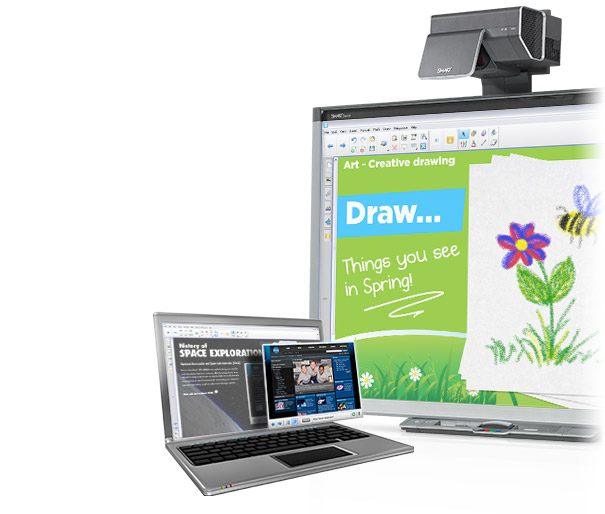 This tool included in Smart Notebook 2015 introduce elements such as ringtones, randomizers and stopwatches.
The concept map maker is a tool that encourages discovery and allows for the visual organization of concepts to promote a deeper level of understanding..
Smarty Notebook delivers interactive and collaborative learning experiences on students' interactive screens and devices, adapting to changes in teaching practices aimed at the adoption of technology.
Smart amp
 Besides, Smart amp cloud collaborative learning software, which was released in 2014 and is available in Spanish and French, allows you to create content on a digital canvas that contributes to collaboration, anywhere and anytime, through student devices. It gives teachers a real-time view of learning and collaboration in their classroom and provides a seamless platform to integrate technology in class with any student device or interactive display..
New Smart amp features:
- Ability to write mathematical equations with the most common symbols, superscripts and subscripts, allowing editing of mathematical equations and collaborative work on mathematical problems in one workspace.
- Object Attribution, that exposes the learning process by providing visibility to the individual contributions of students in a collaborative work area.
- Improved grouping feature that allows teachers to gather students in their own work areas in just a few clicks. Teachers can modify groups by simply dragging students from one group to another.
- Single sign-on to access content from Discovery Education USA and TigTag UK.
Did you like this article?
Subscribe to our NEWSLETTER and you won't miss anything.
Related articles
 Smart expands its range of interactive displays for education and business
 Datapath has its Wall Designer software available for the MacOS platform
 SMART Technologies reinforces its commitment to the interactive panel for education
 More than fifteen million subscribers trust SMART Learning Suite for collaborative learning
 Epson interactive projectors integrate SMART Notebook software
Crambo goes to SIMO Education 2015 with the most innovative offer from Smart Technologies
Epson interactive projectors integrate SMART Notebook software
Crambo goes to SIMO Education 2015 with the most innovative offer from Smart Technologies
 SMART Technologies updates its Smart NB15 collaborative learning software
 Epson and SMART join technologies to promote collaborative learning in classrooms
 OS Software 3.0, now available for all consoles in the Hog range 4
 Software available for Yamaha CL and QL digital consoles and StageMix app
 Collaborative software for classrooms on SIMO Network 2013 from the hands of Charmex
 Charmex has the new collaborative software available for Samsung digital classrooms
 Greater web integration with the new version of SMART Notebook software
BrightAuthor v2.3 digital signage visualization software, available in 4 European languages
Greater web integration with the new version of SMART Notebook software
BrightAuthor v2.3 digital signage visualization software, available in 4 European languages