


TeamViewer se integra con Microsoft Teams para fomentar la productividad en línea
Entre otras ventajas para los usuarios, incorpora los servicios de acceso remoto y soporte para realidad aumentada a este entorno para colaboración y reuniones en línea.
 El proveedor de soluciones de conectividad remota segura TeamViewer ha anunciado una nueva integración con Microsoft Teams, que permitirá a los usuarios de esta plataforma utilizar su soporte remoto y las conexiones de realidad aumentada dentro de este entorno de colaboración en sus reuniones.
This is what he pointed out Alfredo Patron, vp. ejecutivo de desarrollo de negocios de TeamViewer: “mantener la productividad mientras se trabaja a distancia nunca ha sido tan importante. Microsoft Teams lo utilizan organizaciones de todo el mundo para reuniones en línea, colaboración y más. La incorporación de nuestro acceso remoto y el soporte de RA ofrecerá a sus usuarios aún más opciones para colaborar y aumentar la productividad, independientemente de su ubicación”.
La plataforma de Microsoft Teams ofrece una amplia variedad de opciones de comunicación y sirve como un hub que contiene las herramientas que los equipos remotos necesitan para realizar sus tareas.
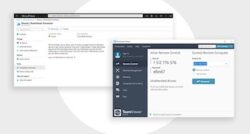
Now, los usuarios pueden descargar la aplicación TeamViewer desde el sitio de aplicaciones de los equipos de Microsoft, entrar en sus cuentas de TeamViewer y compartir inmediatamente las invitaciones para el control remoto o las conexiones de realidad aumentada con sus compañeros de trabajo, en los canales individuales o de grupo, para colaborar y apoyarles de forma más eficiente cuando se necesita ver en directo cuál es el problema.
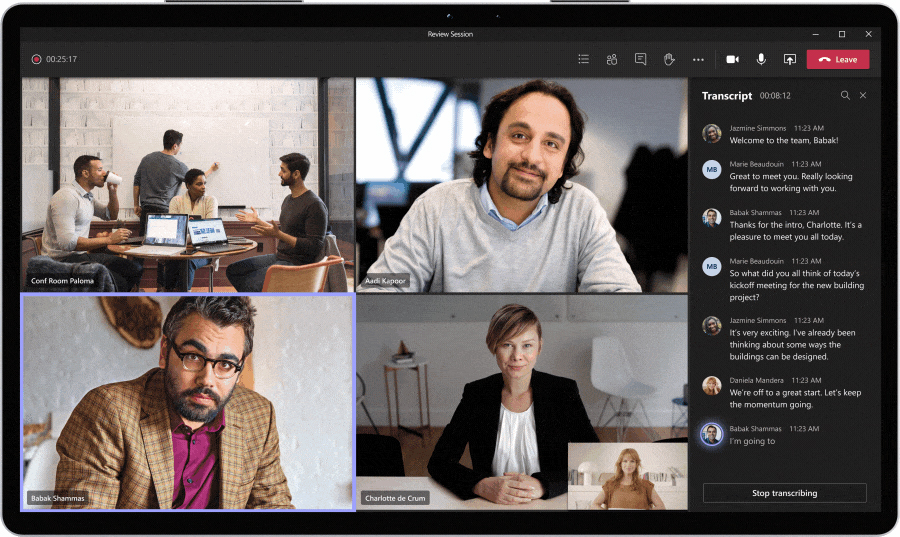 Las conexiones de realidad aumentada son especialmente valiosas cuando se requieren tareas físicas -con TeamViewer Pilot los usuarios pueden apuntar y dibujar ‘virtualmente’ en el campo de visión del usuario para demostrar en detalle qué hacer, así como compartir archivos, escribir y hablar.
Además, gracias a los intuitivos botones de acceso al dispositivo de TeamViewer, los equipos pueden trabajar de forma más eficiente compartiendo instantáneamente el acceso a todos los dispositivos y entornos necesarios con el resto de sus grupos de trabajo. “Tener la capacidad de hacer todo esto desde dentro de la plataforma de Microsoft Teams es clave para una experiencia de usuario intuitiva y una mayor productividad”, they emphasize from the company.
Una vez realizada la integración, los usuarios de los equipos de Microsoft podrán gestionar los grupos de dispositivos a los que pueden acceder, compartir dispositivos con los miembros del equipo y ver su tablero de control de TeamViewer como una ficha personal, que proporciona una vista de todas las sesiones activas, el historial de conexiones y una guía de usuario.
Did you like this article?
Subscribe to our NEWSLETTER and you won't miss anything.
Related articles
 AVer amplía su línea de productos AV certificados para Microsoft Teams
 Earpro&EES y Microsoft: alianza estratégica para impulsar Teams en Iberia
 Ashton Bentley integra en ProjecTable un proyector para Microsoft Teams Room
 Bang & Olufsen se asocia con Microsoft y Zoom para fomentar el teletrabajo
 La plataforma de Utelogy se integra con Microsoft Teams Rooms
 Crestron Flex Phones: solución de conferencia telefónica para Microsoft Teams
 Vivitek actualiza LauncherPlus para fomentar la productividad y seguridad de las reuniones
 Shure incorpora Microflex MXN5-C a su línea de productos certificados para Microsoft Teams
 TeamViewer se integra con EloView para ofrecer conectividad y control remoto de la red digital
 Poly e innovaphone unen tecnologías para fomentar la productividad sin interferencias
 Sennheiser Expand SP 30T: audioconferencias para Microsoft Teams
 TeamViewer Blizz: solución dedicada para conferencias web y colaboración en línea
Osterhout Design Group se integra con TeamViewer para optimizar la experiencia de usuario en realidad aumentada
TeamViewer Blizz: solución dedicada para conferencias web y colaboración en línea
Osterhout Design Group se integra con TeamViewer para optimizar la experiencia de usuario en realidad aumentada
 Copernico Milán: tecnología de proyección y colaboración de Sony para fomentar la productividad