


Mayor integración web con la nueva versión del software SMART Notebook
El proveedor de soluciones colaborativas SMART Technologies cuenta con una nueva versión del software de aprendizaje colaborativo SMART Notebook, que ofrece nuevas características que mejoran la interactividad, la creatividad y la eficiencia.
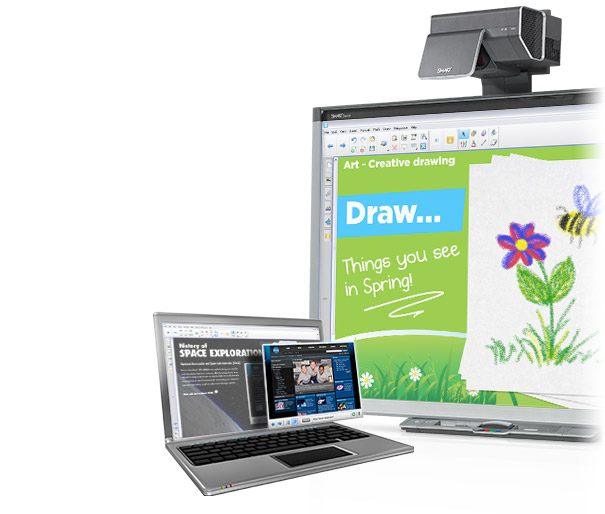 SMART Technologies ha sacado a la venta el software de aprendizaje colaborativo SMART Notebook 11. Esta nueva versión de SMART Notebook permitirá a los profesores integrar los recursos online en archivos de SMART Notebook, mejorando la docencia y la eficiencia en las aulas. El nuevo buscador web, integrado en el software, consigue que los docentes introduzcan directamente una página de un buscador en los archivos de SMART notebook. So, los usuarios pueden escribir, pintar, arrastrar y soltar contenido en la página. The version 11 incluye widgets, como diccionarios y traductores, que harán posible que puedan escribirse preguntas, recibir las respuestas y moverlas a la página del software SMART Notebook.
Un widget de avatares contribuirá a que los profesores lleven estos personales dinámicos y locuaces a SMART Notebook 11 y los guarden en la Galería. Los widgets pueden descargarse de la página web de SMART Exchange , donde los profesores encontrarán más de 51.000 recursos y lecciones, que pueden utilizarse directamente como archivos de SMART Notebook 11. Un kit de desarrollo del software para SMART Notebook brinda la posibilidad a los docentes y desarrolladores de crear para la web un número ilimitado de widgets personalizados. Esta nueva versión estará disponible como descarga gratuita para aquellos que posean una licencia de SMART Notebook.
Más de seis millones de profesores han activado el software SMART Notebook para crear lecciones atractivas que disfrutan ya más de 40 millones de estudiantes de 175 países en todo el mundo. The version 11 añade nuevas características, como herramientas más creativas y eficientes con el fin de aumentar la interactividad. Los estudiantes pueden comprometerse más con herramientas que les permitan personalizar la interacción con la pizarra digital interactiva SMART Board. La característica de los lápices de colores facilita a los alumnos una creación realista de dibujos hechos a lápiz en la pizarra interactiva. Aparte, el rotulador creativo personalizable permite que se construyan rotuladores individuales basados en cualquier imagen.
Mejores herramientas
Las nuevas características ayudan a los docentes a crear objetos con actividad gracias a la herramienta de “construir actividad” que reacciona a cualquier acción con animaciones o sonidos llevados a cabo por los estudiantes o profesores; lo que da lugar a una interacción más atractiva. La mejora de la barra de herramientas contextual consiste en que, cuando los usuarios escogen determinados objetos, la barra también varía en función de estas acciones. So, se ofrece una elección de las herramientas requeridas. La función de reiniciar la página aporta el software SMART Notebook la posibilidad de hacer que al final de la clase todo vuelva a su sitio y podamos usar la actividad en la siguiente clase. SMART Notebook 11 también incorpora nuevos gestos, compatibilidad con la pizarra digital interactiva de cuatro toques SMART Board serie 800 y con el dispositivo interactivo SMART Board 8070i. SMART Notebook 11 es compatible con Microsoft Windows 7, Microsoft Windows XP y los sitsemas operativos Mac Snow Leopard y Mac OSX Lion.
Linda Thomas, vicepresidenta de Producto de SMART Technologies, ha apuntado: “El software SMART Notebook se está utilizando cada vez más y más como un creador de lecciones estándar y una forma de llevar contenidos a todas las clases del mundo. SMART Notebook 11 logra que la colaboración con recursos online sea más interactiva e integral. So, se benefician tanto profesores como estudiantes. Lo que aumenta la creatividad para que los estudiantes mejoren su compromiso con el aprendizaje”.
Características:
Creador de actividades.- crea objetos activos que reaccionan a acciones con sonidos o animaciones.
Buscador Web incorporado.- incluye directamente buscadores web en las páginas de SMART Notebook.
Barra de herramientas contextual mejorada.- Responde a acciones facilitando a los usuarios una elección de determinadas herramientas cuando eligen un objeto.
Lápices de colores.- recrea dibujos de lápices de colores en la pizarra digital interactiva SMART Board.
Rotulador creativo personalizado.- crea un rotulador único a partir de cualquier imagen.
Página de reinicio.- hacer que al final de la clase todo vuelva a su sitio y podamos usar la actividad en la siguiente clase.
Reconocimiento de gestos.- compatible con la interactividad de cuatro toques de la pizarra interactiva SMART Board serie 800 y con el dispositivo interactivo SMART Board 8070i. También reconoce el nuevo gesto de movimiento para agrupar o desagrupar objetos.
Grabación de audio.- graba sonidos directamente en un archivo.
Relleno de la forma de la imagen.- ajusta el tamaño de la imagen para que concuerde con una forma específica.
Tablas actualizadas.- permite transformar, mover e interactuar con las tablas más fácilmente.
Nuevo motor de texto.- permite formatos de texto mejorados y más consistencia.
Tinta atenuada.- cualquier tinta puede ser de un color más tenue.
Marco a página entera.- permite que sea visible la distribución de los bordes de la página.
[youtube]http://www.youtube.com/watch?v=FQygH2iyerA[/youtube]
Did you like this article?
Subscribe to our NEWSLETTER and you won't miss anything.
Related articles
 Avolites presenta la nueva versión de su software de iluminación Titan 15
 Avid presenta la nueva versión de la plataforma de software Venue 7
 Avid presenta la nueva superficie de control S6L 48D y la versión de software 6.2
 AV Stumpfl presentará en LDI 2019 la nueva versión del software Pixera
 Hog 4 renews its flagship console and launches a new version of its software
 Los proyectores interactivos Epson integran el software SMART Notebook
 El software colaborativo para educación Smart Notebook 2015 estará disponible en abril
NEC Display Solutions announces a new version of its Hiperwall software
El software colaborativo para educación Smart Notebook 2015 estará disponible en abril
NEC Display Solutions announces a new version of its Hiperwall software
 LILIN lanza una nueva versión del software avanzado CMX
 Hiperwall 2.0, new version of NEC video wall software
 Lilin releases new version of CMX software 3.6.1.58
 Nueva versión del software de gestión de vídeo IP XProtect Corporate 5 de Milestone
 QNAP lanza una nueva versión de su software de control y administración de NAS
 Ibernex y Tecatel lanzan una nueva versión de la solución de integración Helpnex